Project Overview :
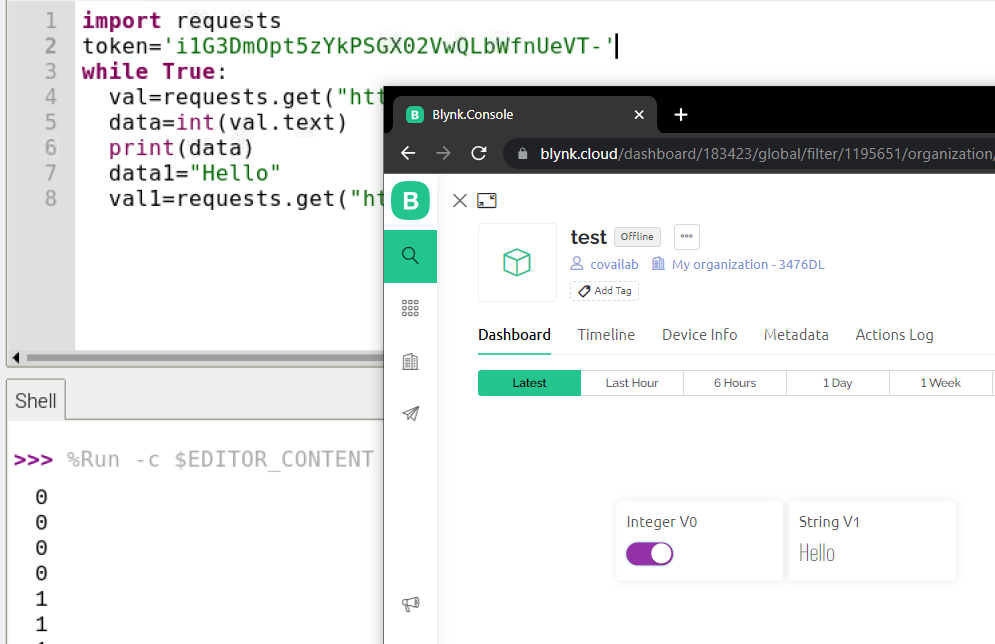
● We are going to create a dashboard in blynk cloud. And send the data and display it in dashboard and also receiving data from cloud dashboard switch.
BLYNK CLOUD :
Click Here , for the blynk cloud.
Requirements :
● Raspberry Pi 3 Model B+ .
Initial setup for RPI-TENSORFLOW :
📚 Click Here , for the initial setup
SPECIFICATION :
Raspberry Pi 3 Model B+
The Raspberry Pi 3 Model B+ is the latest product in the Raspberry Pi 3 range, boasting a 64-bit quad core processor running at 1.4GHz, dual-band 2.4GHz and 5GHz wireless LAN, Bluetooth 4.2/BLE, faster Ethernet, and PoE capability.
The dual-band wireless LAN comes with modular compliance certification, allowing the board to be designed into end products with significantly reduced wireless LAN compliance testing, improving both cost and time to market.

● Processor: Broadcom BCM2837B0, Cortex-A53 64-bit SoC @ 1.4GHz .
● Memory: 1GB LPDDR2 SDRAM.
● Connectivity: 2.4GHz and 5GHz IEEE 802.11.b/g/n/ac wireless LAN, Bluetooth 4.2, BLE Gigabit Ethernet over USB 2.0 (maximum throughput 300Mbps) 4 × USB 2.0 ports.
● Access: Extended 40-pin GPIO header.
● Video & Sound: 1 × full size HDMI, MIPI DSI display port, MIPI CSI camera port, 4 pole stereo output and composite video port.
● Multimedia: H.264, MPEG-4 decodes (1080p30); H.264 encode (1080p30) OpenGL ES 1.1, 2.0 graphics.
● SD card support: Micro SD format for loading operating system and data storage.
● Input Power: 5V/3.1A DC via micro USB connector, 5V DC via GPIO header, Power over Ethernet (PoE)–enabled.
Connection :
● We don’t have to connect any hardware but we need internet for connecting with cloud using Wi-Fi.
Code :
import requests
token='...your token from blynk....'
while True:
  val=requests.get("https://blr1.blynk.cloud/external/api/get?token={}&V0".format(token))
  data=int(val.text)
  print(data)
  data1="Hello"
  val1=requests.get("https://blr1.blynk.cloud/external/api/update?token={}&V1={}".format(token,data1))
OUTPUT :